Supplier packshots to on-model product images · 14 min read
Supplier Packshots to On-Model PDP Images: A Buyer’s Guide
Turn supplier and wholesale packshots into consistent on-model PDP images: intake triage, garment fidelity, SKU mapping, and Accept / Rework / Hold — managed catalogue production, not a DIY app.
By Surajnarayanan SUpdated
At a glance
- Mixed supplier packshots need intake triage before generation — not a prompt per SKU
- Continuity + garment fidelity + SKU mapping beat “pretty” singles
- DIY drafts; managed AI Catalogue Production owns approved PDP delivery and channel rules
8M Studio is a managed production studio, not a self-serve packshot app. This page is useful even if you never work with us.
Direct answer
Supplier and wholesale packshots become on-model PDP images when you normalise mixed studio inputs into one continuity standard, then generate and review every SKU against the source garment. The hard parts are lighting and angle drift, fabric and drape truth, SKU mapping, and who owns Accept, Rework, and Hold. Self-serve packshot-to-model tools can draft frames. Managed AI Catalogue Production fits when multi-brand volume needs one accountable delivery owner and channel-ready files.
Best for
- +Multi-brand retailers and high-volume fashion brands receiving supplier or wholesale packshots from many studios
- +Teams at roughly 250–350 product-image jobs a day who need consistent on-model PDPs without a full reshoot per SKU
- +Buyers who want an operating guide for intake, continuity, garment fidelity, SKU mapping, and QC ownership before a production-fit call
- +Photo studios adding AI who need a production partner, not a free app
Not designed for
- -A rewrite of mannequin / flat-lay to on-model at scale
- -DIY packshot-to-model app tutorials, prompt recipes, or free-credit funnels
- -Invented prices, savings percentages, keyword volumes, or “best tool” rankings
- -Campaign / editorial image families
- -Consumer fashion filters, celebrity-likeness casting, or children in any imagery
- -Claiming a UK office or address
Direct answer: what supplier packshots to on-model PDP means
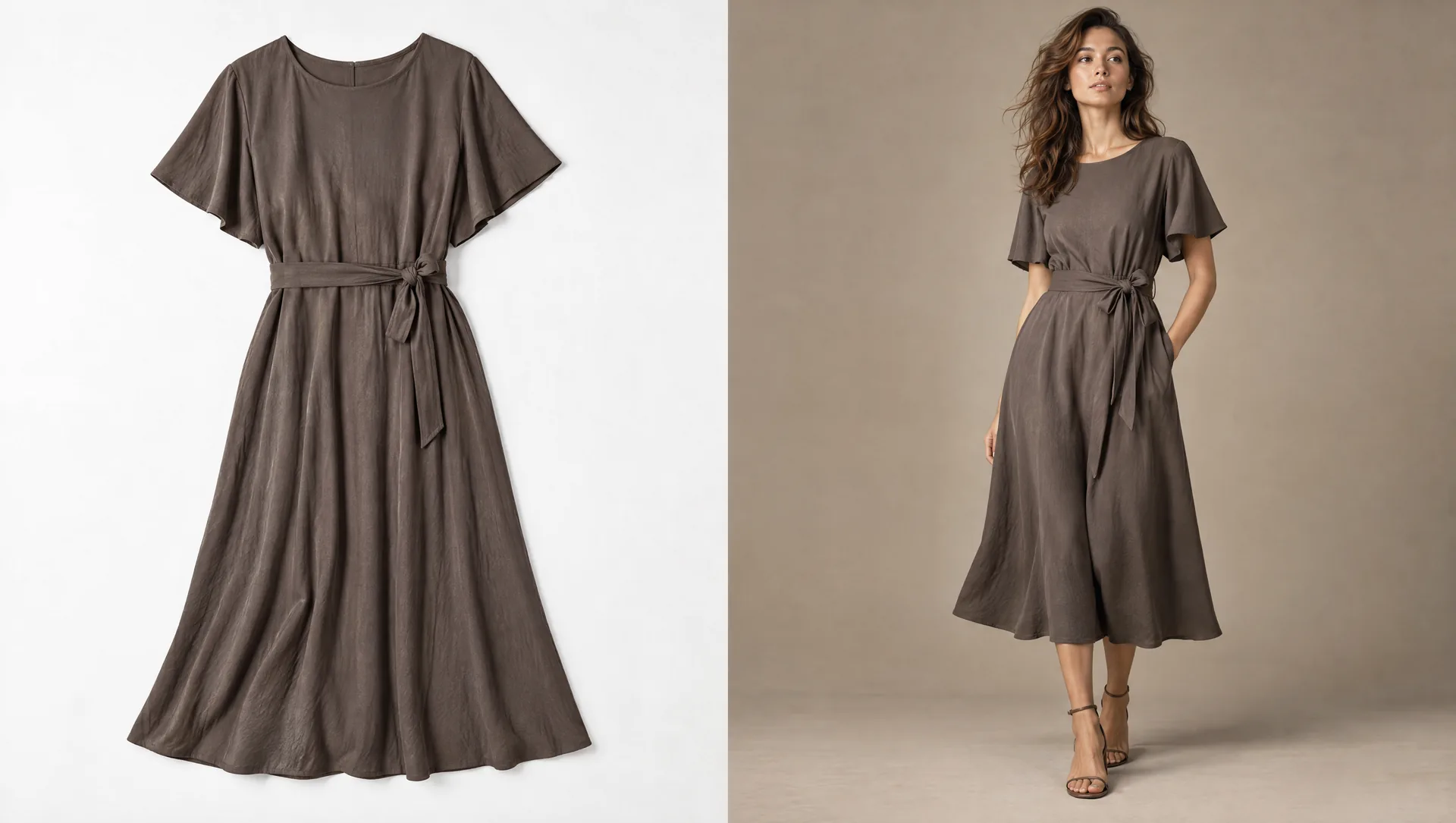
Supplier packshots to on-model product images means taking the product stills that arrive from manufacturers, wholesalers, and brand partners — often flat, hanger, ghost, or simple studio packs — and producing consistent on-model frames for your product pages. The garment must stay true. The catalogue must look like one brand book, not a folder of unrelated supplier shoots.
Wholesale packs raise the same job with more variance: different studios, different lighting, different angles, different file naming. Multi-brand retailers feel this hardest. High-volume single brands feel it when drop calendars outrun shoot capacity.
8M Studio is a managed production studio, not a self-serve packshot app. This page is useful even if you never work with us.
"We're an AI-native service business. We're not an app, and we're not a generic IT services shop."
How this page relates to mannequin/flat-lay, channel rules, and tools vs managed
Mannequin / flat-lay guide
Mannequin and flat-lay to on-model at scale is the live operating note for those input types. It only mentions packshot libraries in passing. This page owns supplier and wholesale packshot intake as the primary problem: mixed studios, mixed lighting and angles, multi-brand continuity, SKU mapping, and rights clarity.
Ghost mannequin chooser
How to choose a ghost mannequin service for apparel is the route when the deliverable is still ghost, not on-model.
Channel guidelines
Fashion ecommerce image guidelines by channel maps Shopify, Amazon Fashion, and marketplace-class rules into one production matrix. Use it for export specs. This page names why channel rules matter once packshots become PDPs; it does not replace the matrix.
Tools vs managed
AI fashion tools vs managed production is the general chooser. Apply it here to supplier-packshot volume.
Garment fidelity and QC
Why DIY AI fashion images fail on garment fidelity is the failure-mode companion when print, lace, colour, neck or silhouette drifts. The AI fashion imagery QC checklist is the working Accept / Rework / Hold form.
Shopify programmes and UK buyers
Shopify batch on-model AI product photos is the page when the storefront programme is Shopify-led. AI product photography for UK fashion brands is the page if the reader is UK-based. 8M serves UK brands remotely; this page does not claim a UK office.
Why now: vendor pages everywhere, no neutral buyer’s guide
Homepage pitches and wholesale product pages are already selling the same sentence: supplier photos in, on-model catalogue photos out. Uwear, Photopilot, Colect Creator Studio, Setset’s wholesale page, and similar tools all compete for that job. What shows up for “supplier packshots to on-model product images” is almost all vendor pages.
What is missing is a calm buyer’s guide written from production ops: what breaks when inputs come from many studios, what QC must protect, when self-serve drafts are enough, and when managed delivery is the honest fit. This page fills that gap without inventing rankings or savings claims.
What breaks when supplier packs become your PDP
Name the breaks before you generate volume.
Mixed lighting and angles
Supplier A shoots hard top light and three-quarter crop. Supplier B shoots flat soft light and full-length. Side by side on your PDP grid, the book looks like three different brands.
Garment truth drift
Packshots can hide drape. On-model generation can invent fabric feel. Shoppers notice when cotton reads like plastic or silk collapses into a generic sheen.
"DIY often fails on fabric truth. Cotton, silk and plastic-looking synthetics read differently in a real photo; shoppers can tell."
Obvious AI that kills trust
Unchecked cheap generation is not a catalogue programme.
"A bad image costs you conversion on the PDP. Shoppers spot AI that looks like AI and feel cheated, so they don't buy."
SKU mapping failures
Files named IMG_4021.jpg from a wholesale ZIP do not map to your style-colour-size. Without a manifest and naming convention, approved images never land on the right PDP.
Rights and reuse ambiguity
Supplier packs may be licensed for wholesale line sheets, not for your consumer PDP, paid social, or marketplace feeds. Clarify reuse before you industrialise generation.
No named QC owner
If “close enough” ships because the drop date moved, you do not have a programme. You have a hope.
Intake triage: what to demand from supplier and wholesale packs
Normalise at intake. Generation multiplies whatever you accept.
The mannequin and flat-lay guide covers shooting flats for conversion. Here the input often already exists — your job is triage and standardisation, not teaching every supplier to become a studio.
Minimum usable pack
- One sharp, full-frame front view per colourway that genuinely differs
- Back view when the garment has meaningful rear detail
- Close detail of print, hardware, lace, embroidery, or label that matters to the buyer
- Even light, pressed sample, clean background preferred — phone showroom shots can work if the garment is fully visible and unobscured
- File names, or a companion CSV, that map to your SKU, style, and colourway codes
Reject or fix before generation
- Cropped garments missing neck, hem, or sleeve truth
- Heavy shadows or crushed blacks that hide colour
- Multiple garments in one frame with no isolation
- Watermarks or supplier logos that must not reach the PDP
- Colourways that share one photo when the true colour differs
Continuity standard, written once
Write model identity or casting band, backdrop, lighting direction, crop and margins per product group, pose library, and retouch rules once. Saved direction beats a new prompt per SKU.
Intake / Before generation
Triage the pack, then lock the book
Generation multiplies whatever intake accepts.
Triage
Front, back and detail where product truth needs them. Reject cropped, watermarked or unmapped packs.
Continuity
One casting band, light, backdrop, crop and pose library for every supplier SKU.
Map
Style and colourway on every file before a frame is generated.
ControlA prompt per SKU is not an intake standard.
Continuity, garment accuracy, SKU mapping, rights
Continuity
One visual language across suppliers. The supplier’s photography style should stop at the input. Your PDP should not inherit five studio aesthetics.
Garment accuracy
Print scale, neckline, closures, true colour, lace and embroidery, silhouette and fabric behaviour stay in scope. Art direction can change pose and crop. It cannot invent product features. Hold wrong truths even when the model look is strong.
Colourway accuracy for a shopper try-on is a different brief: ChatGPT virtual try-on product images. The term itself is defined in what is virtual try-on.
SKU mapping
Every output file must map back to style and colourway, and to size only if your PIM requires size-specific images. Manifests beat hope. Wholesale ZIPs without mapping cost more in ops than in generation.
Rights and reuse clarity
Confirm you may produce and publish consumer PDP, marketplace, and paid crops from the supplied stills. If rights are unclear, Hold the programme — do not industrialise a licence problem.
Accept / Rework / Hold for mixed-studio inputs
Review every on-model frame against the source packshot and the locked continuity standard.
Accept
Garment matches the reference, continuity holds, crop is channel-ready, and SKU mapping is correct.
Rework
Direction and references are right, but this frame is off — light, crop, identity drift, or a correctable garment miss.
Hold
The frame cannot represent the product honestly, the source pack is unusable, or rights are unclear. Do not publish a close tint or a fabric lie because the calendar moved.
"After generation, an agent tool checks the garment against the reference — layout, logos, QC. If those are wrong, the image goes back for rework. Frames that pass go to our retouching partners for the final clean. Nothing ships until that retouch pass is done."
Score the batch
Use the QC checklist as the working form. Score continuity across the batch, not only beauty on a single SKU.
Channel rules: Shopify, Amazon, and marketplace specs as managed work
Once packshots become PDPs, export rules matter. Background, aspect ratio, main-image constraints, on-model versus packshot acceptance, and marketplace-specific crops differ by channel. The living matrix is fashion ecommerce image guidelines by channel. Re-check Shopify Help and Amazon Seller Central before a drop. This page does not invent a rule a portal does not publish.
Shopify Help publishes storefront media guidance — file types, upload limits, and the practical note that high-resolution images, often square masters, display more cleanly in a theme. It does not impose a fashion-marketplace main-image law on every apparel SKU. Amazon’s clothing image guidelines and product image guide are the live Seller Central pages for main-image and clothing rules. Read those pages for the drop you are shipping. If the on-model frames use an AI-generated model, Amazon also asks for a metadata keyword before upload — see Amazon's AI-generated model image tag.
If the same files also go to Google Shopping, the image still has to show the product, and generative images have to keep their AI metadata. That path is Google Merchant Center AI product images.
Before upload, run the finished set through the AI image label checker.
On this page the offer is managed AI Catalogue Production that delivers channel-optimised files — we do it for them — not a DIY settings panel.
"Brands shouldn't have to juggle Shopify vs Amazon vs marketplace image rules themselves. We already build tools for that — we optimise the images to those channel rules for them."
DIY and self-serve packshot tools vs managed AI Catalogue Production
Fair to DIY. No vendor scoreboard. No prices.
What self-serve packshot-to-model tools are good for. Contained tests when skilled operators own generation, retries, SKU sorting and review. Category examples buyers already evaluate include Uwear-class catalogue pipelines, Photopilot-class house-model services, Setset-class wholesale tools, and Vibiz, Dreem and Generama-class product studios. This page does not invent their prices, accuracy, or failure rates.
Where DIY often stops. No named owner for Accept / Rework / Hold across mixed-supplier batches. Weak continuity when lighting and angles vary. Garment fidelity left to the operator. Channel exports and marketplace rules left as homework. Rights and reuse not in the workflow.
What managed AI Catalogue Production adds. Intake triage, locked continuity, generation under those rules, human review against source packshots, a retouch pass, SKU-mapped delivery, and channel-ready crops inside an agreed scope. The offer is managed catalogue production.
When the question is self-serve versus studio in general, read AI fashion tools vs managed production.
| Question | Self-serve packshot-to-model tool (typical) | Managed AI Catalogue Production (typical) |
|---|---|---|
| Job | Draft on-model frames from a packshot | Approved on-model PDP sets from mixed supplier and wholesale intake |
| Continuity | Often per session or preset | Locked brand direction across suppliers |
| Review state | Download or discard | Accept / Rework / Hold with a named owner |
| SKU mapping | Often manual after download | Delivery mapped to style and colourway |
| Channel rules | Operator homework | Optimised delivery as part of the programme |
| Failure mode | Pretty frames that break fabric truth or book continuity | Review bandwidth if intake packs are weak |
| When it fits | Contained tests with skilled operators | Recurring volume in the 250–350 jobs-a-day class that needs one delivery owner |
Decision guide
- 1. Is the input mostly supplier or wholesale packshots from multiple studios, or is it your own mannequin and flat-lay programme? If the latter, start with mannequin and flat-lay to on-model at scale.
- 2. Can you write one continuity standard — model or casting, light, backdrop, crop, pose — that every supplier SKU must obey?
- 3. Do you have SKU mapping (style and colourway) and rights clearance to publish consumer PDPs from those packs?
- 4. Will someone review each frame against the source packshot under Accept / Rework / Hold, including fabric and drape?
- 5. Do Shopify, Amazon and marketplace crops matter on the same drop calendar?
- 6. If drafts from a self-serve tool are the only output and nobody owns Hold, do not ship them as the catalogue.
- 7. If the job is approved on-model PDP volume with one delivery owner, route to AI Catalogue Production.
- 8. If intake, QC and channel exports must share one governed pipeline, that is Custom AI Production Systems.
Where 8M Studio fits
AI Catalogue Production is the primary fit when supplier and wholesale packshots must become approved on-model PDP images. Clients brief continuity and acceptance rules. The studio runs intake triage, generation, review, retouch, SKU-mapped delivery, and channel-ready files within an agreed scope — including Amazon and Shopify rules as managed work, not a DIY app. See managed catalogue production.
Custom AI Production Systems fits when packshot intake, QC gates, identity continuity and multi-channel exports must share one operating model. AI head swap is a capability inside that system for governed identity work. It is not the product on this page.
AI Campaign Production fits only when the brief is an art-directed launch family, not PDP packshot volume. If the job is still ambiguous, read AI campaign vs catalogue production. When the stall is approved catalogue volume rather than the intake method, read the fashion catalogue production bottleneck guide.
8M Studio is not a self-serve packshot-to-model generator. There is no credit dashboard and no free-generator funnel on this page.
The ideal first call is a small or mid-size ecommerce fashion brand already selling well, roughly 250–350 product-image jobs a day, that wants imagery which does not look like AI and wants someone to own production end to end. Photo studios adding AI who need a partner fit the same conversation. That band is founder language for who the work suits. It is not a capacity promise. Free DIY and rock-bottom work with no quality bar is a turn-away.
Managed programmes can run at about 8k images a month in studio-partner-style pipelines. That figure describes operating scale. It is not a capacity promise for every brief, and it does not name partners.
Public brand: 8M Studio only. 8M serves UK fashion brands remotely. See AI product photography for UK fashion brands. This page does not claim a UK office or address.
Buyer checklist before you industrialise supplier packshots
- 1. Name the job: consistent on-model PDPs from supplier and wholesale packs — not more pretty AI.
- 2. Inventory input types: packshot, flat, hanger, ghost, phone showroom — and which suppliers dominate volume.
- 3. Write continuity rules once: casting, light, backdrop, crop, pose, retouch.
- 4. Demand front, back and detail where product truth needs it. Reject unusable packs early.
- 5. Lock SKU mapping (style and colourway) and a delivery manifest.
- 6. Confirm rights and reuse for PDP, marketplace and paid crops.
- 7. Name Accept / Rework / Hold owners. Review against source packshots, not only beauty.
- 8. Pilot hard garments — prints, lace, tricky fabrics — before scaling easy solids.
- 9. List channel crops (Shopify, Amazon, others) in the brief before production.
- 10. Price approved, uploaded images, including review labour, not generation credits alone. The planning frame is product photography pricing for fashion ecommerce.
- 11. Book catalogue production only when steps 1–9 are real.
Before the call / Control sheet
Name the pack before you book
Catalogue production starts when intake, mapping and owners exist.
Intake
Which suppliers, which shot types, and which packs are rejected before generation.
Truth
Continuity rules, garment holds, and a style-plus-colourway manifest.
Rights
Clearance to publish PDP, marketplace and paid crops from the supplied stills.
Owner
Accept, Rework and Hold against the source packshot, including a hard-garment pilot.
ControlBook AI Catalogue Production only when those lines are real.
Frequently asked questions
What does supplier packshots to on-model product images mean?
It means turning manufacturer or wholesale product stills into consistent on-model frames for your product pages while keeping the garment true. The hard parts are mixed studio lighting and angles, fabric and drape accuracy, SKU mapping, and QC ownership. Pretty generations without those controls are not a catalogue programme.
Can AI turn wholesale packshots into an on-model catalogue?
Yes, AI production can generate on-model views from packshots, flats and similar inputs when continuity rules and garment references are locked. Every frame should be reviewed against the source photo before it reaches a PDP. Self-serve tools can draft; managed production fits when volume and QC need one owner.
Why do multi-brand retailers struggle with supplier photos?
Each supplier brings different lighting, angles, crops and naming. Side by side, the storefront looks inconsistent and SKU mapping breaks. Continuity has to be imposed at intake, not hoped for at publish.
What should a usable supplier pack include?
At minimum, a sharp full-frame front view per colourway, plus back and detail views when product truth needs them, with files mapped to your style and colour codes. Clean light and an unobscured garment save more rework than any prompt tweak. Unusable packs should be rejected before generation.
How does Accept / Rework / Hold apply to packshot inputs?
Accept means the on-model frame matches the source garment and the continuity standard. Rework means the brief is right but this frame needs a fix. Hold means the product cannot be represented honestly or rights and intake are unclear — do not publish close enough.
Are DIY packshot-to-model tools enough?
They can be enough for contained tests when skilled operators own review, mapping and channel exports. They often stop short when mixed-supplier continuity, fabric truth and marketplace rules need a named delivery owner. 8M Studio’s fit here is managed AI Catalogue Production, not a self-serve generator.
Do Shopify and Amazon image rules change the job?
Yes. Background, aspect, main-image and on-model versus packshot rules differ by channel, so approved masters still need channel-ready crops. Brands should not have to juggle those portals alone when a managed programme can optimise delivery to the published rules. Always verify the live Shopify Help and Amazon Seller Central pages.
Is 8M Studio a self-serve packshot app?
No. 8M Studio is a managed AI fashion catalogue and campaign production studio. It is not a self-serve packshot-to-model tool and not a free AI generator. Clients brief continuity and acceptance rules; the studio operates production and human QC inside an agreed scope.
Evidence and sources
- Shopify Help — Product media types - Storefront product media: supported types, upload limits up to 5000×5000 px or 25 megapixels and under 20 MB, and the note that square images around 2048×2048 px usually display best. Not a fashion-marketplace main-image law. Re-check Shopify Help before a drop. Verified 2026-10-07.
- Amazon Seller Central — Image guidelines for clothing - Live clothing image guidelines. Sign-in may be required, so this page does not restate those rules. Re-check Seller Central before a drop. URL confirmed 2026-10-07.
- Amazon Seller Central — Product image guide - Product image requirements, including main-image standards. Sign-in may be required. Re-check before a drop. URL confirmed 2026-10-07.
- Google Merchant Center — Image link - The main image has to show the product, and generative-AI images have to keep IPTC DigitalSourceType metadata. Pair with the Merchant Center companion. Verified 2026-10-07.
- Fashion ecommerce image guidelines by channel - Living production matrix for Shopify, Amazon Fashion and marketplace-class exports. This page does not replace it.
Continue the decision
Lock continuity and QC, then book the call
If supplier and wholesale packshots need to become one consistent on-model PDP book — with garment fidelity, SKU mapping and channel-ready crops — lock continuity and QC ownership first. Then book a production-fit call for managed AI Catalogue Production when approved delivery is the job.