Chatgpt virtual try-on product images · 9 min read
ChatGPT Virtual Try-On: What Product Images Fashion Brands Need Now
ChatGPT now shows a Try on button on clothing listings. What fashion brands need now: one accurate main image per colourway, faithful garment detail, and size answers on the page.
By Surajnarayanan SUpdated
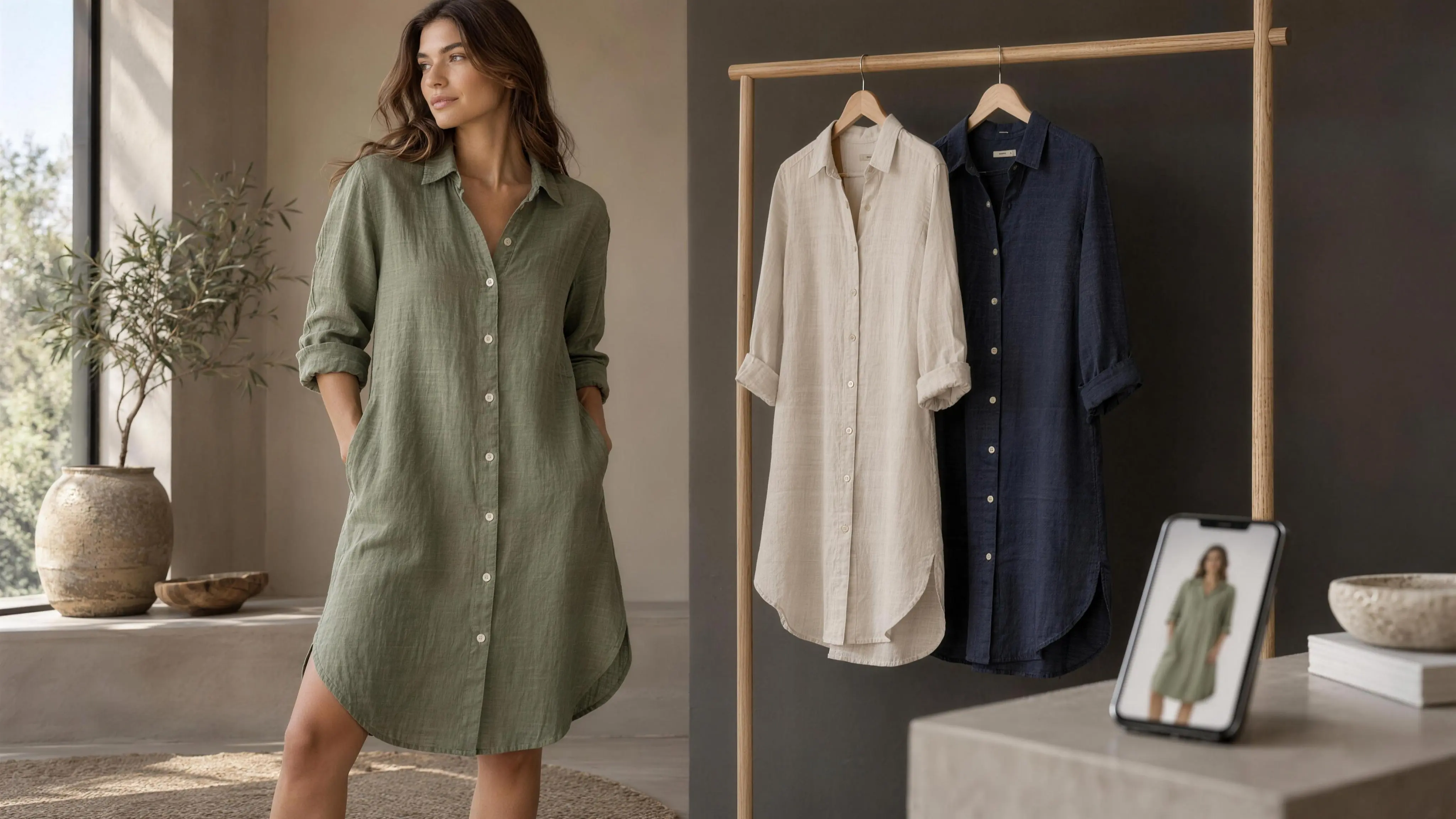
At a glance
- One main image per colourway, showing that exact variant. Sizes of the same colour can share one.
- Garment truth first: print, neckline, closure, true colour and visible details must match what ships.
- Try-on shows a look, not a size. The product page still answers fit.
Direct answer
ChatGPT added a "Try on" button to clothing and accessory listings on 1 October 2026. For brands, the work is product imagery, not a new app. Give every colourway its own accurate main image of that exact variant. OpenAI's product feed asks for this. Show prints, necklines, closures and true colour clearly. Keep size charts and fit notes on the product page, because OpenAI says try-on images don't guarantee fit or size.
Best for
- +Fashion ecommerce and catalogue teams whose products may appear in ChatGPT shopping (Shopify stores, or brands sending a product feed)
- +Teams with some colourways photographed well and others on flats, ghost or placeholder images
- +Content-ops leads who need a checklist to hand to production, not a news summary
Not designed for
- -A guide to getting listed in ChatGPT, or a promise that a product will show the Try on button
- -A review or ranking of virtual try-on apps
- -Sizing technology advice. We cover what the product page must say, not which fit tool to buy
- -Legal advice on shopper photos or AI image labelling
Direct answer
ChatGPT now shows a "Try on" button on clothing and accessory listings in its shopping results. A shopper takes or uploads a selfie and ChatGPT generates an image of them wearing the item. OpenAI launched it worldwide on 1 October 2026, and press coverage says it runs on ChatGPT Images 2.5.
For a fashion brand there is no new app to install and no special try-on file to make. The work sits in the product images you already publish. Every colourway needs its own accurate main image showing that exact variant. The garment's distinguishing details (print, neckline, closure, true colour, trims) have to be visible and correct. Size and fit still have to be answered on your product page, because OpenAI itself tells shoppers the preview doesn't guarantee either.
8M Studio is a managed production studio, not a try-on tool and not affiliated with OpenAI. This page is useful even if you never work with us.
What OpenAI actually launched (and what it hasn't said)
Here is what OpenAI has published, in its own words where possible:
- Where it appears. "A 'Try on' button appears on product listings for clothes and accessories." (OpenAI Help Center)
- How it works. The shopper selects the button, takes or uploads a selfie, and views a generated try-on image. "Your virtual try-on is created with ChatGPT Images." Shoppers can also upload a picture of clothing in a conversation and ask how it would look on them. TechCrunch reports that OpenAI said the shopping features use the new ChatGPT Images 2.5 model.
- The limit. "Try-on images may not represent the product or your appearance exactly and do not guarantee fit or size. Check the merchant's measurements, product details, and return policy before buying." (OpenAI Help Center)
- Availability. ChatGPT on mobile and web, announced 1 October 2026 in OpenAI's release notes. TechCrunch describes it as a global launch.
- How products get there. For Shopify merchants, OpenAI says product data "is already integrated into ChatGPT through Shopify Catalog" and that "no additional work is required from individual merchants". Other merchants can apply to send a direct product feed.
What OpenAI has not published
What OpenAI has not published: which of your images the try-on reads, any image size or format rule specific to try-on, or how it decides which listings get the button. Treat any guide (including this one) that claims to know those things as guessing. What we can say is our reading, not an OpenAI fact: the listing it sits on is built from your product data, including your images, so treat your main image as the likeliest input, and the one you control.
The image has to make sense on its own
One more route matters. A shopper can screenshot your product from anywhere (your site, a marketplace, a social post) and ask ChatGPT to put it on them. In that case your image travels without your title, colour name or size chart. It has to make sense on its own.
Rule 1: one accurate main image per variant and colourway
OpenAI's product feed reference is direct about this. The required image_url field is the "Main product image, showing this variant." The optional color field is the "Selected color, consistent with the product image." Variants go in separate rows that share a group_id, and "each row carries its own price, availability, URL, and images."
In practice:
Colours get their own main image. Sizes usually don't need one.
OpenAI's own example gives two sizes of the same black shoe the same image. On our reading, sizes of the same colour can share an image and colours should not, because a size-only variant looks identical. A sage dress row pointing at the navy dress photo is a wrong record, though. If a try-on runs from that row, the shopper sees themselves in the wrong colour.
Shopify works the same way
Shopify lets you assign one image to each variant and keep extra views in the product's media gallery. Shopify Catalog passes "title, description, options, images, price, availability" to AI channels, so a colourway with no assigned image, or the hero colour's photo reused, carries that gap into ChatGPT.
Additional views support the main image
additional_image_urls takes "additional views of this item": back, detail, on-model, worn. Use them, but don't rely on them to fix a wrong main image.
The common failure is the secondary colourway
The common failure isn't the hero colour. It's the secondary colourways: the ones shot as a flat-lay, the ones with a recoloured placeholder, the ones that borrow the hero's model photo. If those are the gap, read AI colourway swaps for an on-model catalogue. It covers locking true colour against the garment and swatch, not just a hex value.
"Once a shopper can try the garment on in ChatGPT, a wrong colourway photo becomes a wrong product. We lock print, neckline, closures and true colour to the garment before any colourway ships."
Truthful listings and imagery
OpenAI's commerce policies set the bar plainly: "Merchants must provide truthful listings and imagery," and may not misrepresent a product's "key characteristics." A colourway image that isn't that colourway fails the policy before it fails a try-on.
Rule 2: garment fidelity. The details a try-on has to carry
A try-on image can only be as faithful as the product information behind it. If the print is soft, the neckline is hidden by hair or the colour is off on your photo, there's nothing correct for a generated preview to carry over. Shoppers then compare what they saw in ChatGPT with what arrives.
These are the details we check before any image counts as a main image. They're the same ones that commonly fail in AI-made fashion images (see why DIY AI fashion images fail on garment fidelity):
| Detail | What "accurate" means on the main image | Common miss |
|---|---|---|
| Print and pattern | Scale, placement and repeat match the garment; motifs readable, not mushy | Print rescaled, mirrored or smeared; stripes bending wrongly at seams |
| Neckline and collar | Shape, depth and finish visible; nothing covering it | Hair, scarf or crop hiding the neck; V vs scoop ambiguous |
| Closures | Buttons, zips, ties, hooks shown in the right number, position and finish | Button count wrong; zip hidden; wrap dress shown as pullover |
| True colour | Matches the physical garment under neutral light, checked against a swatch | Warm grade on a cool colour; navy reading black; whites going cream |
| Fabric and texture | Weave, knit, sheen or transparency readable | Linen looking like polyester; satin flattened; sheer shown opaque |
| Visible details | Pockets, pleats, trims, hardware, embroidery, hem shape | Pockets missing; lace simplified; hem curve straightened |
| Silhouette and length | Cut and length read correctly on the frame | Cropped frame hides length; styling changes the shape |
A simple test before you ship
Crop the main image away from its page and show it to someone who hasn't seen the product. Can they name the colour, the neckline, how it closes and the print? If not, the image is leaving that work to a model that will guess.
On-model or packshot: which input to give a try-on
OpenAI hasn't said which kind of product image works best for its try-on. What follows is our production view, not OpenAI guidance.
Packshots, ghost mannequin and clean flat-lays show the garment alone. Nothing overlaps it: no hair across the neckline, no arm over the closure, no styling layer hiding the hem. For telling a system exactly what the garment is, a clear full-garment view of the right colourway on a plain background is hard to beat.
On-model images show what a packshot can't: drape, length on a body, how a neckline sits. They're also what shoppers expect on fashion PDPs, and some channels ask for on-model main images for adult apparel (see fashion ecommerce image guidelines by channel). The risk is everything around the garment: a jacket worn open over a shirt, a belt that isn't sold with the dress, a pose that hides a closure, a crop that cuts the hem. A model working from that image can't tell what's for sale and what's styling.
A practical rule set:
- Main image: the full garment, exact colourway, nothing important covered. On-model is fine if the pose and styling hide nothing. Otherwise use a clean packshot, as long as the channel allows it.
- Additional images: on-model front and back, detail close-ups (print, closure, fabric), and a worn context frame.
- Same garment truth across both. If the on-model frame and the packshot disagree on colour or print, one of them is wrong, and the try-on may pick either.
- No styling that isn't sold, or make it obvious, on the main image.
Try-on, catalogue stills, and the shot list
For the wider difference between a shopper try-on and finished catalogue imagery, see virtual try-on vs on-model catalogue. For which views every SKU should have, see the fashion ecommerce product photography shot list.
ChatGPT try-on vs building your own try-on tool
ChatGPT's try-on doesn't replace a try-on on your own site, and it isn't one. For the other forms of try-on, such as live camera AR and 3D avatars, see what is virtual try-on. They're different things:
| Question | ChatGPT try-on | Brand-owned try-on on your PDP |
|---|---|---|
| Where it happens | Inside ChatGPT, before the shopper reaches your store | On your product page |
| Who runs the model and UI | OpenAI (ChatGPT Images) | You or your vendor |
| What it works from | A ChatGPT listing built from your product data, or a screenshot the shopper uploads | Your own catalogue, configured by you |
| Control over output | None beyond the quality and accuracy of your product data and images | Your choice of vendor, settings, review and fallbacks |
| Shopper photo | Goes to OpenAI; shoppers manage it in Settings → Personalization → Reference photos | Goes to you or your vendor, under your privacy terms |
| Size advice | None. OpenAI says images "do not guarantee fit or size" | Depends on the tool; some pair try-on with size recommendation |
| Merchant cost | No merchant fee is described on OpenAI's shopping help page | Vendor pricing, integration and maintenance |
| What you have to do | Keep product data and per-variant images accurate | Choose, integrate, maintain and QC a tool, plus the same images |
Both routes run on the same images
The point of the table is the last row. Both routes run on the same thing: accurate product images of each variant. If you're considering an on-site try-on tool, sort out the catalogue images first. That work pays off in ChatGPT, on your PDP, in Google Shopping and on marketplaces. A try-on tool won't fix a wrong colourway photo either.
If those images are AI-made and you also send them to Google Shopping, keep the IPTC metadata Google asks for. See Google Merchant Center AI product images.
Size and fit still have to be answered on the product page
OpenAI is explicit that the preview is a look, not a fit check: "Try-on images may not represent the product or your appearance exactly and do not guarantee fit or size. Check the merchant's measurements, product details, and return policy before buying."
That sends the shopper to your product page with one question left: which size? The page has to answer it without a click-hunt:
- Size chart as text on the page, not only as an image or a pop-up, with units and how each measurement is taken.
- Garment measurements (chest, length, inseam, sleeve) where they matter, separate from body measurements.
- Fit notes in the description: cut (relaxed, regular, slim), stretch, whether it runs small or large, and the model's height and size worn on on-model images.
- Return and exchange terms easy to find from the product page, since OpenAI tells shoppers to check them.
- Same facts everywhere. The size, colour and fabric on the page, the feed and the structured data should agree.
Images help here too
A clear on-model frame with the model's size stated, and a back view, answer fit questions a try-on preview can't.
Practical checklist before your next drop
Run this on a few representative products first, ideally one with several colourways and one with a complex print or closure.
Per variant
- 1. Every colourway has its own main image showing that exact colour. Size-only variants of the same colour can share one.
- 2. On Shopify, each colour variant has an assigned variant image, not the hero colour's photo.
- 3. In a direct feed, each row's image_url shows that row's variant, and color matches what's in the image.
- 4. No placeholders, recoloured mock-ups or "colour shown may vary" stand-ins on main images.
Garment fidelity
- 5. Print, neckline, closures, fabric, trims and silhouette are visible and correct on the main image.
- 6. True colour has been checked against the physical garment or an approved swatch, not just a colour name.
- 7. On-model and packshot frames of the same colourway agree on colour and detail.
- 8. Nothing on the main image is styling that isn't sold, or it's obvious.
Standalone test
- 9. Cropped away from its page, the main image still tells a stranger the colour, neckline, closure and print.
- 10. No text, badges or watermarks on main images.
Product page
- 11. Size chart in text, garment measurements, fit notes and the model's size are on the page.
- 12. Returns and exchanges are one click from the product.
- 13. Title, colour, price and stock match across page, feed and structured data.
Ownership
- 14. A named reviewer signs Accept / Rework / Hold on every colourway's main image before it goes live. Use the AI fashion imagery QC checklist.
- 15. Then check ChatGPT yourself. Ask for a product you sell, open the listing and, if the button appears, try it on. Do it more than once and in more than one way. One answer isn't a ranking.
Where 8M Studio fits
8M Studio is an AI-native service business. In Suraj's words: "Today we do three things for ecommerce: AI catalogue production, AI campaign images, and custom AI production systems built for a company's own workflow… We're not an app, and we're not a generic IT services shop."
AI Catalogue Production fits when the gap this page describes is real: secondary colourways without accurate on-model or packshot images, prints and closures that drift between frames, or no one owning sign-off per variant. Clients bring product references and acceptance rules. We produce per-variant sets and review every frame against the garment before delivery, inside an agreed scope.
Custom AI Production Systems fits when per-variant image production, feed exports and QC need to run as one governed pipeline inside your own workflow.
What we don't do: we aren't a try-on tool, we're not connected to OpenAI, and we can't get a product into ChatGPT shopping or make the Try on button appear. Nobody can promise that.
See AI Catalogue Production, or book a production-fit call if your colourway images are the gap.
Frequently asked questions
What is ChatGPT virtual try-on?
ChatGPT virtual try-on is a "Try on" button on clothing and accessory listings in ChatGPT shopping that generates an image of the shopper wearing the item from their selfie. OpenAI launched it on 1 October 2026 on mobile and web. OpenAI says it's created with ChatGPT Images, and press coverage names the 2.5 model.
What product images does ChatGPT try-on use?
OpenAI hasn't published exactly which images the try-on reads. The button sits on a listing built from your product data, which includes your images, and OpenAI's feed spec requires a main image "showing this variant." Treat an accurate main image per colourway as the input you control.
Do I need a new photoshoot or special files for ChatGPT try-on?
No special try-on file or 3D model is documented. You need accurate images of each colourway you sell, with the garment's details visible. A new shoot or AI production only makes sense where colourways are missing, placeholders or wrong.
Does every size need its own image?
Usually not. Size-only variants of the same colour look identical, and OpenAI's own feed example gives two sizes the same image. Every colourway, print or material variant should have its own main image.
Is on-model or packshot better for ChatGPT try-on?
OpenAI hasn't said, so this is production judgement. A clean full-garment view of the exact colourway shows what's for sale most clearly. On-model images add drape and length, but styling and pose can hide details. Use whichever shows the full garment uncovered as the main image, and the other as additional views.
Does ChatGPT try-on tell shoppers what size to buy?
No. OpenAI says try-on images "do not guarantee fit or size" and tells shoppers to check the merchant's measurements, product details and return policy. Your product page has to answer size and fit.
Is ChatGPT try-on the same as having a try-on tool on my site?
No. ChatGPT's try-on runs inside ChatGPT on OpenAI's model, before the shopper reaches you. An on-site tool runs on your PDP under your control. Both depend on accurate per-variant product images.
Can 8M Studio get my products into ChatGPT try-on?
No. Nobody outside OpenAI can promise placement or the Try on button. 8M Studio is a managed AI catalogue production studio: we produce and review accurate per-variant product images, which is the part of the listing you control.
Evidence and sources
- OpenAI Help Center — Shopping with ChatGPT Search - Try on button, ChatGPT Images, fit/size disclaimer, Shopify Catalog, direct feeds. Checked 2026-10-06.
- OpenAI Release Notes — New ways to shop in ChatGPT - 1 Oct 2026. Checked 2026-10-06.
- OpenAI Developers — Agentic Commerce, Products - image_url "showing this variant", color, variants, additional_image_urls. Checked 2026-10-06.
- OpenAI — Commerce policies - "Truthful listings and imagery." Checked 2026-10-06.
- OpenAI — Introducing ChatGPT Images 2.5 - 8 Sep 2026.
- TechCrunch — ChatGPT can now virtually try on clothes for you - Sarah Perez, 1 Oct 2026. Press attribution for ChatGPT Images 2.5 and the global launch.
- Engadget — ChatGPT can now help you virtually try on clothes - 1 Oct 2026. Press attribution for ChatGPT Images 2.5.
- Shopify Help — Shopify Catalog and product discovery for agentic storefronts - Checked 2026-10-06.
- Shopify Help — Adding images to product variants - Checked 2026-10-06.
Continue the decision
Fix the colourways first
ChatGPT can now show a shopper your garment on their own photo. That preview is only as accurate as the image of each colourway you publish. Fix the colourways first. If that's a production gap, book a production-fit call about AI Catalogue Production.