Ghost mannequin photography · 6 min read
What Is Ghost Mannequin Photography?
A plain-English definition of ghost mannequin photography, also called invisible mannequin or hollow man: how the effect is made, worked examples by garment, how it differs from flat lay and on-model, and how to produce it at scale with AI.
By Surajnarayanan SUpdated
Definition
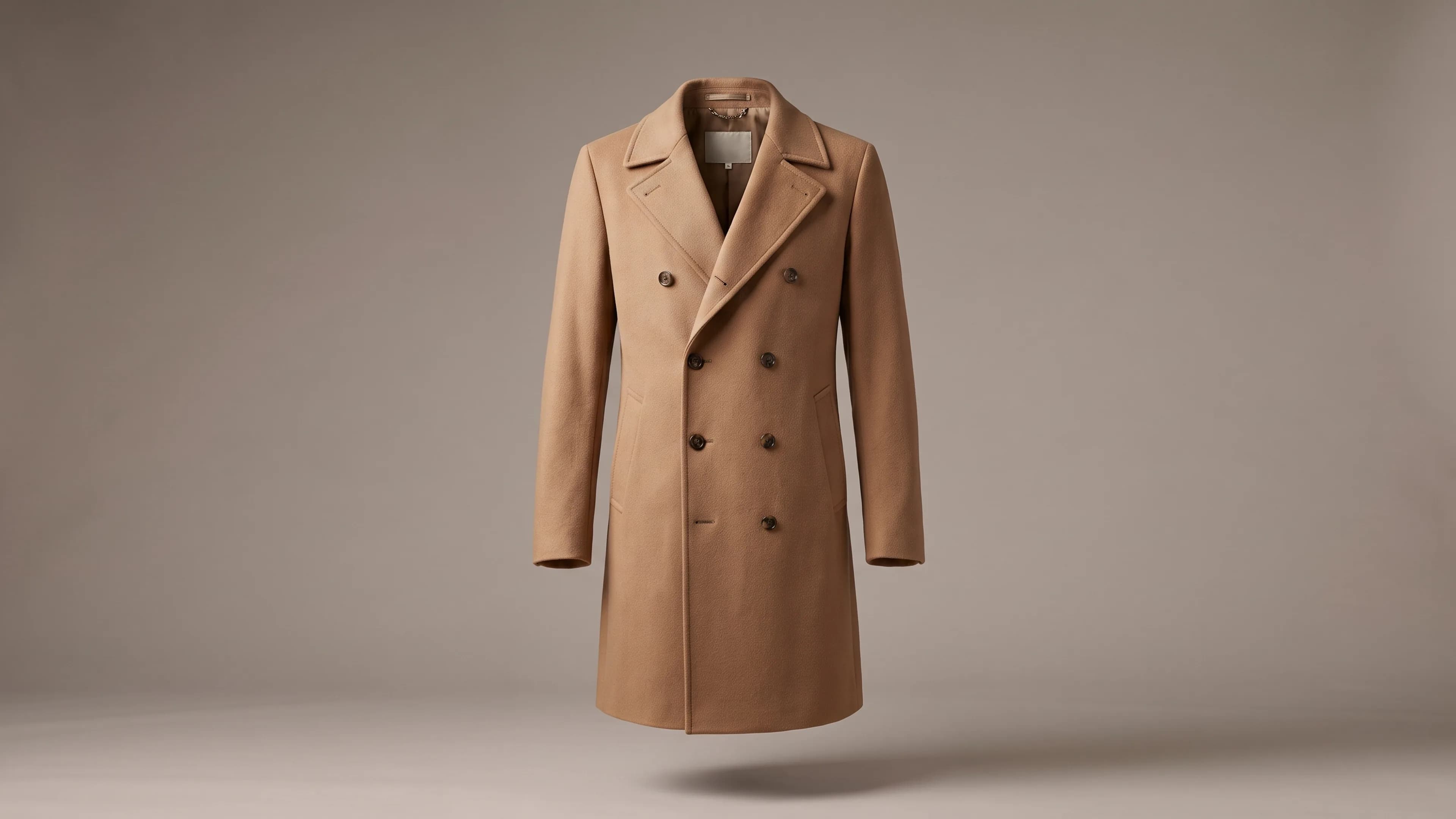
Ghost mannequin photography is a way of photographing clothing on a mannequin and then removing the mannequin in editing, so the garment keeps its worn, three-dimensional shape but appears to be worn by no one. Most studios also photograph the inside of the collar and blend it in, so the neckline reads as hollow rather than cut off.
At a glance
- Ghost mannequin, invisible mannequin and hollow man name the same effect: a garment in its worn shape with no visible form or person
- The classic method joins a main shot and an interior shot, then edits the mannequin out
- Worked examples for a hoodie, a denim jacket, a sheer blouse and a knit cardigan
- What AI changes at catalogue volume, and what still needs a human check
A glossary-style explainer from 8M Studio, a managed AI fashion production studio. Choosing between suppliers is covered in a separate guide linked below.
Direct answer
Ghost mannequin images are made in three stages: dress a mannequin, photograph the garment and its hidden interior, then edit the form out and join the pieces. Brands use them for clean, consistent catalogue views. At volume, AI can now reconstruct the hollow form, but every generated area still needs checking against the real garment.
Best for
- +Ecommerce, merchandising and marketplace teams writing their first ghost mannequin brief
- +Founders and buyers weighing ghost mannequin against flat lay and on-model images
- +Catalogue leads planning to produce ghost mannequin views with AI at volume
Not designed for
- -Comparing ghost mannequin suppliers or quotes: see how to choose a ghost mannequin service
- -Per-image prices: see product photography pricing for fashion ecommerce
- -Showing how a garment fits a particular body, which needs an on-model view
Where the name comes from, and other names for it
The name describes the result: the garment looks as if an invisible person, a ghost, is wearing it. You will see the same technique sold as invisible mannequin, hollow man or 3D ghost photography. These are trade names for one effect, not different products, so compare what a studio actually delivers rather than the label.
The effect exists to keep the shape a body gives clothing, such as a rounded chest, open sleeves and a collar that stands up, without a model's pose, hair or styling competing with the product. A garment laid flat loses that volume. A garment left on a visible mannequin shows a prop the shopper isn't buying.
How a ghost mannequin image is made
A classic ghost mannequin image is a composite of at least two photographs taken without moving the camera or lights. The garment is shot on a mannequin, a second shot captures the area the mannequin hides, and a retoucher removes the form and blends the pieces into one clean, hollow-looking image.
- Dress the form. Studios use mannequins with removable chest, neck or arm panels so the inside of the garment can be photographed later. The garment is steamed and pinned so it sits straight.
- Shoot the main view. Front, and usually back, with camera and lights locked so every SKU lines up on the category grid.
- Shoot the insert. With the panel removed, or the garment turned inside out on the form, photograph the inside back neck, the label area and any opening the form hid.
- Edit and join. A retoucher masks out the mannequin, places the insert behind the neckline and matches the shadows so the neck joint disappears.
- Check and export. Compare colour against the physical sample, then export the crops each sales channel asks for.
Ghost mannequin examples by garment type
The technique behaves differently on every garment, so it helps to look at specific pieces. The four illustrative examples below are not client case studies. Each shows what the ghost effect has to preserve, where the hidden detail lives, and what a reviewer should compare against the physical sample before the image goes live.
| Garment | What the ghost effect must keep | Hidden detail to capture | What to check before release |
|---|---|---|---|
| Pullover hoodie | The hood standing open, the front pocket and the drawcord length | The hood lining and the inside back neck, often a contrast colour | Lining colour, and that both drawcords hang evenly |
| Denim jacket | Collar roll, button count and the stiffness of the fabric | The inside of the collar stand and the yoke label | Button count, stitching colour, and that the collar has not been flattened |
| Sheer blouse | Transparency, without the mannequin showing through | Seams and facings visible through the fabric | That no shadow of the form remains behind the sheer panels |
| Knit cardigan | Rib texture, the button band and a soft, natural drape | The inside neck and the back of the button band | That the knit texture has not been smoothed and the band runs straight |
Swimwear, lingerie and heavily structured tailoring each bring their own problems, so test one piece of each type before you brief a whole range. The full view list for a product page, ghost views included, is in the fashion ecommerce product photography shot list.
Ghost mannequin, flat lay and on-model: where each fits
Ghost mannequin, flat lay and on-model are presentation styles, and most apparel pages mix them. Ghost mannequin shows shape and construction consistently across a range. Flat lay suits graphics, sets and items with little volume. On-model shows fit and drape on a person, which is why some channels ask for it as the main image.
On a typical apparel product page, the person sells the fit and the ghost views answer the follow-up questions: what the back looks like, how deep the neckline sits, where the pockets are. Channel rules differ on which image may lead, so check fashion ecommerce image guidelines by channel before you fix the view list.
Ghost mannequin and flat-lay packs are also good source material when you later want on-model images without a shoot. That conversion is covered in mannequin and flat-lay to on-model at scale.
How to do ghost mannequin at scale with AI
At catalogue volume, AI can take over the most manual editing step: removing the form and rebuilding the hollow interior. It works best when the source photos already show the detail you sell. The hard part of scaling is the brief, the reference pack and a review that holds anything unverifiable.
- Standardise capture. Shoot every SKU on the same form, angle, light and background, plus an interior shot for any neckline you must show accurately.
- Write the view list and acceptance rules once: front, back, detail, crop, background, and how the inner neck should look.
- Generate in batches, then compare every output with its source photo and the physical sample or a reference shot. Generated areas such as labels, linings and collars get the closest look.
- Hold rather than guess. If a label, lining or closure cannot be checked, request a new reference instead of publishing the AI's version of it.
- Keep the AI label in the file. Google Merchant Center asks that the IPTC DigitalSourceType metadata on generative-AI images is retained, so don't strip it on export.
The review gates are set out in the AI fashion imagery QC checklist. Colourways deserve their own decision, because recolouring one shot into another colour is an edit of a different garment; see AI colorway swaps for an on-model catalogue.
8M Studio runs this as a managed service, not a self-serve tool. Within AI Catalogue Production, ghost mannequin views can be part of the agreed view set when the brief needs them, and existing ghost mannequin packs can be the input for on-model images. Published rates for traditional ghost mannequin shoots are listed, with their sources, in the product photography pricing guide.
Ghost mannequin terms to know
Briefs and quotes for ghost mannequin work use a small vocabulary that is worth agreeing before production. Knowing these terms makes it easier to say exactly which views you need, which hidden areas must be photographed, and what counts as a finished image when you compare a studio, an editor or an AI route.
- Insert: the extra photograph of the garment's interior, usually the inside back neck, used to fill the hollow.
- Neck joint: the blended seam where the insert meets the main image. A visible line or halo here is a typical fault.
- Mannequin removal: editing out the form without adding an insert. Simpler, but the neckline looks cut off rather than hollow.
- Invisible mannequin, hollow man, 3D ghost: other names for the same effect.
- Packshot: a clean, product-only image on a plain background. A ghost mannequin image is one kind of apparel packshot.
- Flat lay: the garment laid flat and photographed from above, with no form at all.
- On-model: the garment worn by a person, which shows fit in a way a ghost view cannot.
Frequently asked questions
Why is it called ghost mannequin photography?
Because the finished garment looks as if an invisible wearer, a ghost, is inside it. The mannequin used on set is edited out, so the clothing keeps a body's shape with no visible form or person.
Are invisible mannequin and hollow man photography the same thing?
Yes. Invisible mannequin, hollow man and 3D ghost are trade names for the same effect. Studios may bundle different views or edits under each name, so compare the deliverables rather than the label.
What is the difference between ghost mannequin and flat lay photography?
Flat lay photographs the garment laid flat from above, so it loses the volume a body gives it. Ghost mannequin keeps that worn, three-dimensional shape. Flat lay suits graphics and sets; ghost mannequin suits garments whose shape and neckline matter.
What do you need to shoot ghost mannequin photos in-house?
A mannequin with removable panels, a fixed camera position, consistent lighting on a plain background, a steamer and pins, and editing time for masking and joining. The fixed setup is what keeps a whole range consistent.
Which garments are hardest to shoot as ghost mannequin?
Sheer and lace pieces, where the form can show through; structured collars and lapels; hoods; and knits whose texture is easy to smooth away in editing. Test one of each before briefing a whole range.
Does AI ghost mannequin work for a whole catalogue?
It can, when every SKU is shot the same way and someone reviews each output against the garment. Simple tops tend to come through best. Hold any image where a label, lining or closure was generated and cannot be checked.
Does 8M Studio produce ghost mannequin images?
8M Studio is a managed AI production studio, not a self-serve tool. Ghost mannequin views can be included in an AI Catalogue Production view set when the brief needs them, and existing ghost mannequin packs can be used to produce on-model images.
Evidence and sources
- Google requires generative-AI product images used in Shopping data to retain the IPTC DigitalSourceType TrainedAlgorithmicMedia metadata tag. Verified 2026-08-13.
- How to choose a ghost mannequin service for apparel - 8M Studio's supplier chooser: views, inserts, neck joints and QC to agree before pricing a batch.
- AI fashion imagery QC checklist - 8M Studio's working checks for generated garment regions before release.
Continue the decision
Need ghost mannequin views at catalogue volume?
Bring a representative garment, its source photos and the views you need, and we'll check whether they can be produced faithfully inside AI Catalogue Production.